
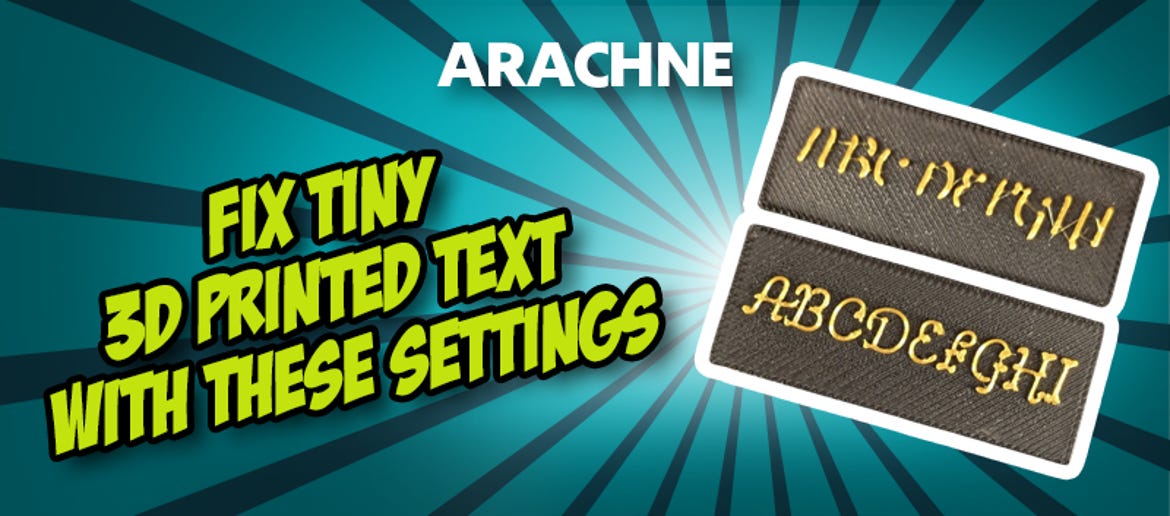
Improving Small Text in 3D Printing: Achieve Perfectly Clear & Legible Text at Last! to Make Your Text Clear & Legible!
You print a model with fine lettering or intricate details and take it off the print bed, only to find that instead of clean typography, you’re left with blurred lines, merged letters, or barely legible text. Many FDM printers can't handle small inscriptions well. However, most of the time, the issue isn't the printer itself, but rather incorrect slicer settings.
Whether it’s logos, engravings, signs, or technical labels, small text is one of the most common challenges in FDM printing. Fine details tend to vanish if lines are printed too thick or if the printer is running too fast. This is exactly why many inscriptions appear out of focus or lose their shape entirely.
Why Small Text Becomes Blurry in 3D Printing
In FDM 3D printing, material is applied line by line. The problem is that small letters often consist of extremely narrow sections that can rarely be printed cleanly with a standard line width. This leads to typical issues like blurred letters, merged details, unreadable fonts, and missing fine contours.
It becomes particularly critical with small font sizes or tight spacing between individual lines. Many standard slicer settings are simply not optimised to render ultra-fine details cleanly.
Arachne: The Most Important Setting for Fine Details
One of the most effective features for fine text in 3D printing is the so-called Arachne Wall Generator, or Adaptive Line Width. This function dynamically changes the line width during the print. Instead of using the same width throughout, the slicer automatically adjusts the extrusion lines to suit the geometry of the model. This is exactly what allows small details to be rendered with significantly higher precision.
This means:
- finer lines for small structures,
- improved legibility of text,
- sharper edges and contours,
- fewer lost details.
Especially with small letters, this function makes a huge difference!
Why Adaptive Line Width Works So Well
Normally, a slicer tries to print every wall with a fixed line width. The problem is that some areas are simply too narrow for this. The slicer then either has to ignore details or "squeeze" lines, which leads to messy results. With the Arachne function, the line width is adjusted flexibly. This allows the printer to render even very narrow areas cleanly without losing any detail.
Especially for:
- small texts,
- logos,
- engravings,
- miniatures,
- technical labelling,
… Adaptive Line Width ensures visibly better results.
The Right Settings for Sharp Text
In addition to Arachne, there are other settings that have a major impact on small details.
One of the most important is the layer height. For fine text, you should work with low values. The following usually work particularly well:
- 0.08 mm,
- 0.10 mm,
- 0.12 mm.
This ensures that curves and fine contours are rendered much more cleanly.
Speed also plays a major role. Many printers lose precision during small movements if the print speed is too high. Therefore, it's worth reducing the Outer Wall Speed. A value of around 50% often provides visibly sharper results.
Slicers That Support Arachne
The good news is that you don't need any special software. Many modern slicers already support Adaptive Line Width directly.
These include:
- Cura,
- PrusaSlicer,
- Bambu Studio,
- OrcaSlicer.
Depending on the software, you can find the function under terms like Arachne, Adaptive Wall Generator, or Adaptive Line Width.
Typical Mistakes with Small Text
When 3D-printed text doesn't turn out clean, it's often due to several factors at once. Typical mistakes include:
- layer height set too high,
- print speed too high,
- adaptive line width disabled,
- unsuitable font size,
- line width set too thick.
Even small adjustments here can make a huge difference.
Conclusion: Print Small Text Cleanly Instead of Losing Details
If you've had problems with blurry text or lost details in the past, you don't necessarily have to reach for a smaller nozzle right away. Often, the right slicer settings are enough to render small text in 3D printing much more clearly. By using Arachne / Adaptive Line Width, reduced Outer Wall Speed, and a finer layer height, you can get visibly more detail out of your print without any complicated tuning!
Latest reviews
-
-
SUNLU Silk PLA+ Dual Color Red Blue, 1.75 mm / 1000 g
- Two-colour experience
- Glossy, silky smooth surfaces
- High toughness & impact resistance
Magazine Articles:
-
Delivery in 3 business days.
More than 10.550 products
We deliver worldwide to
more than 40 countriesSecure payments
with SSL encryption technology
